


nelna
Nelna Anywhere Stand | Magnetic Modular Stand Board (6-in-1)
Nelna Anywhere Stand | Magnetic Modular Stand Board (6-in-1)
Couldn't load pickup availability
Unfold It, and Your Own Workspace Begins.
From a tablet and laptop stand to a book holder and desk organizer — transform it freely to fit your workflow.
Key Features
-
Magnetic Modular System
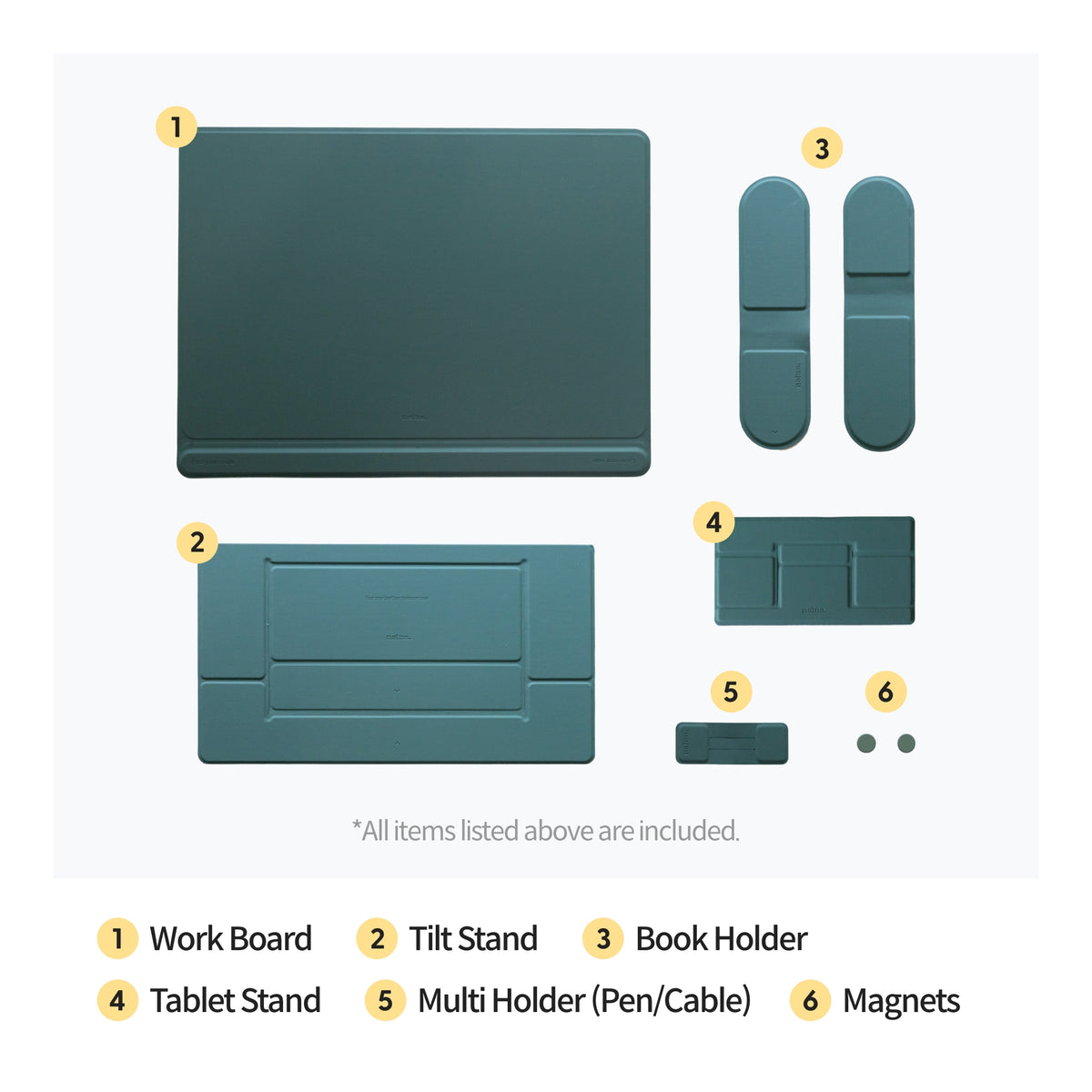
Includes 6 components: Work Board, Tilt Stand, Tablet Stand, Book Holder, Multi Holder, and 2 Magnets. Combine them magnetically to create your ideal setup. -
Comfortable Angle Adjustment
Choose your preferred angle to reduce strain on your neck and shoulders for a comfortable posture. -
Keep Everyday Essentials Within Reach
Secure cables, pens, and earphones on the Multi Holder, and attach notes using the Magnets to access tools instantly. -
Compact & Lightweight
Folds down to just 4.6mm (0.18 in) thin for easy storage and portability. Comfortably handles everyday devices like a tablet or laptop. (Dimensions: 33 x 24.5 x 22 cm / 13" x 9.6" x 8.7" — Weight: 969g / 2.1 lb — Recommended load: 5kg / 11 lb) -
Built to Last
Crafted with a premium PU finish, polycarbonate, and fiberglass, backed by a high-strength steel core that keeps its shape even after repeated folding.
Recommended Uses
- Book Stand — Hold a book open on both sides and keep your hands free.
- Tablet Stand — Prop up your tablet for note-taking, video calls, or streaming at a comfortable angle.
- Laptop Riser — Raise your laptop to eye level and work comfortably without neck or shoulder strain.
- Desk Organizer — Keep your timer, cables, earphones, and notes neatly within reach.
Please Note
- Avoid contact with sharp objects, and clean the surface using only a soft cloth dampened with water. (Do not use alcohol-based cleaners.)
- Keep away from direct sunlight, extreme heat, or high humidity.


check this
notice for all digital products
DESCRIPTION
· Intended for digital note apps with PDF support: GoodNotes, Notability, CollaNote, Noteshelf, Penly etc.
· This is NOT a physical item. A digital file will be downloadable right after purchase and as with digital items, no refunds or exchanges are accepted after download.
· All formats on Nelnashop can only be used by the customer for individual purposes, without resale in any way, shape, or form.
· Unauthorized copies, appropriation, and distribution are strictly prohibited.
RETURNS & EXCHANGES
· Due to the nature of digital downloads, no exchanges or refunds are possible after download.
· Please double-check the product/version/color before purchasing.
· This product can be used on Laptops and phones, but it is not recommended due to Hyperlink errors and small screen usability.
· Refunds for issues from non-Tablet devices are not accepted.
· Refund requests for individual opinions on design elements (color, font size) and page structure or change of heart are not accepted.
· Refunds or exchanges for cases where the customer does not fully and sufficiently read the instructions in the details page will not be accepted.
· Note apps such as GoodNotes, Notability, CollaNote, and Noteshelf are not included with this product and should be purchased separately.
· All formats marketed on NelnaShop are intellectual property under legal protection.
· Items are intended for individual use ONLY and cannot be resold in any shape or form.
· Unauthorized copies, appropriation, and distribution may be prosecuted by related laws.
FAQ
How to Download a Digital Planner
· For your better understanding, all instructions are based on GoodNotes app.
· Download the product through Safari - if not using Safari, there might be an error.
1. Purchase and download the product.
2. After download, click on Safari’s download list on the top right - hand side - Share - Open in GoodNotes.
3. Click Import as New Document.
4. Success!
How to add Sticker PNGs
1. Open GoodNotes and disable View Mode on the top right-hand side.
2. Click on the Image icon on the top menu.
3. Import the PNG sticker.
4. Click on the Image once again and click Cut.
5. Select Freehand.
6. Draw around the edges of the sticker you want.
· You can adjust the size of the Image with the arrows on the sides
HyperLinks
The hyperlinks will not work in Editing mode.