


nelna
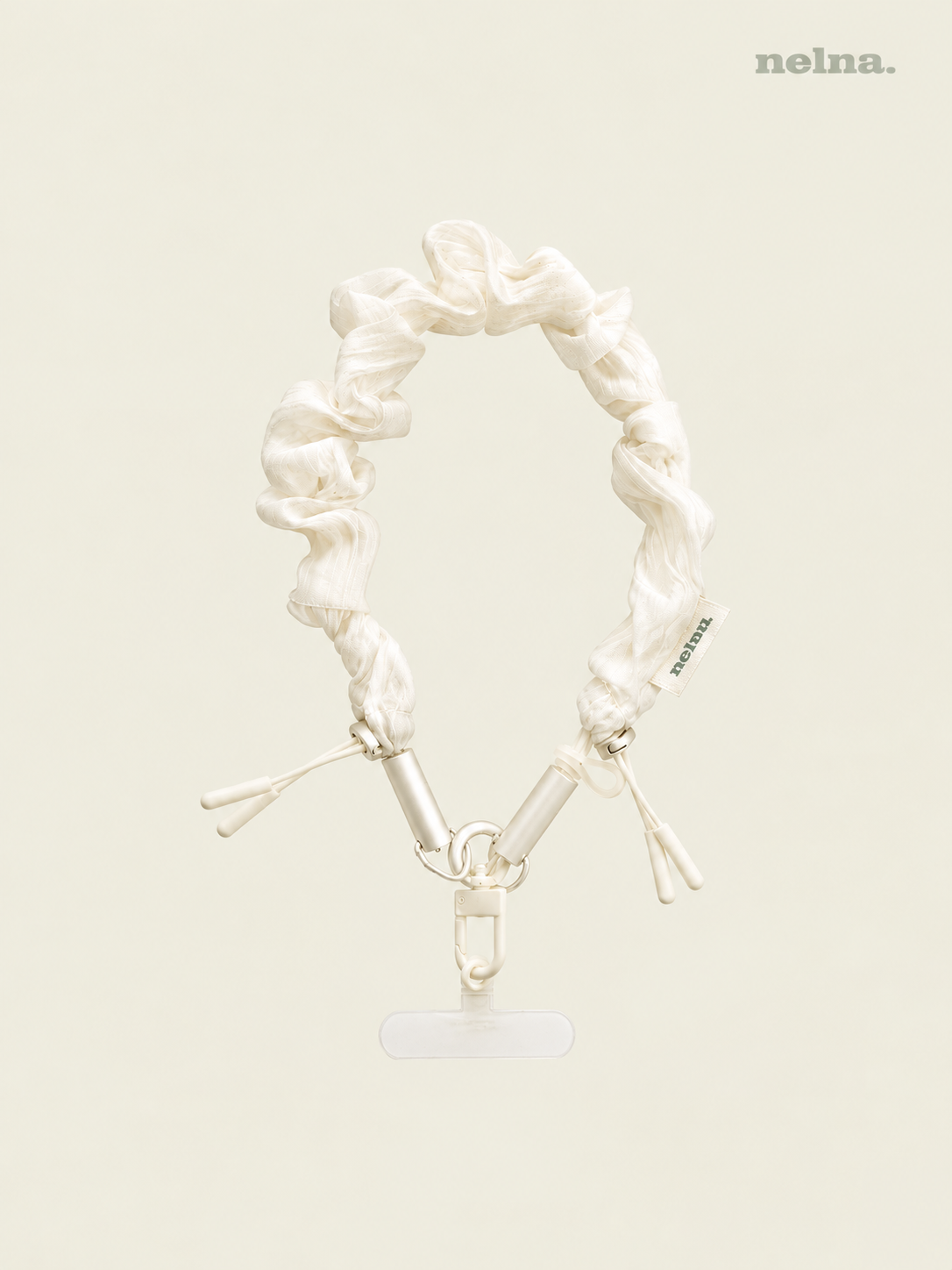
Nelna Cable Strap Set | USB-C Charging Cable Phone Lanyard
Nelna Cable Strap Set | USB-C Charging Cable Phone Lanyard
Couldn't load pickup availability
Wear It Today. Plug It In Anytime.
Nelna's Cable Strap Set is a clear, everyday strap that doubles as a high-speed cable. Plug it into your fast-charging adapter for up to 60W, whenever you need it.
Key Features
-
2-in-1 Hidden Cable
Wear it as a soft, pastel-clear strap day to day, then release the cover to reveal a high-speed cable whenever you need it. The connector stays neatly hidden and protected when not in use. -
Fast Charging & Data Transfer
Supports up to 60W fast charging and 480Mbps data transfer, making it versatile enough for everything from smartphones to low-power laptops. (Based on USB-C to USB-C spec — requires a fast-charging adapter) -
Use Your Own Case. Connect with Ease.
No need to buy a whole new case. As long as your phone case has a full-coverage bottom, simply insert the tag holder to set up your strap in seconds. -
Tangle-Free 360° Carabiner
A freely rotating design keeps the strap from tangling, finished with a refined, seamlessly integrated ring for an even cleaner look. -
Detachable Strap Cover
Easily remove the cover whenever it needs a wash or a little care. (Replacement covers aren't sold separately at this time.) -
Ready to Wear
The cover comes pre-installed, so there's no assembly — just unbox and wear.
Recommended For
- On-the-Go Emergency Charging: At the airport, a café, or on public transit, skip the hunt for a spare cable — just unclip the strap and plug in.
- Hands-Free Everyday Convenience (LONG): Wear it around your neck or shoulder to keep your phone secure and your hands completely free—whether you're holding a coffee, walking the dog, or carrying extra bags.
- Sleek Wrist Accessory (SHORT): Wrap the shorter version around your wrist like a bracelet, offering a comfortable and stylish fit even over thick sleeves.
Please Note
- Phone Case Compatibility: Requires a phone case with a full-coverage bottom. It cannot be secured in open-bottom or frame-only bumper cases.
- No Adapter Included: This is a charging cable only and does not include a wall adapter. Please use it with any compatible USB-C adapter you already have.
- Fixed Length: The length is fixed by design — please don't knot it shorter, as this can damage the internal cable.
- Water & Damage Warning: Avoid wet environments and stop using the cable immediately if it becomes damaged.
- Material Texture Notice: Due to the clear material, minor threads may appear on the surface with natural wear. This is a normal characteristic of the material and not a defect.
- First-Time Use: Remove the protective film over the hidden connector before your first use.
- Care Instructions: Hand-wash recommended; do not bleach or tumble dry.


check this
notice for all digital products
DESCRIPTION
· Intended for digital note apps with PDF support: GoodNotes, Notability, CollaNote, Noteshelf, Penly etc.
· This is NOT a physical item. A digital file will be downloadable right after purchase and as with digital items, no refunds or exchanges are accepted after download.
· All formats on Nelnashop can only be used by the customer for individual purposes, without resale in any way, shape, or form.
· Unauthorized copies, appropriation, and distribution are strictly prohibited.
RETURNS & EXCHANGES
· Due to the nature of digital downloads, no exchanges or refunds are possible after download.
· Please double-check the product/version/color before purchasing.
· This product can be used on Laptops and phones, but it is not recommended due to Hyperlink errors and small screen usability.
· Refunds for issues from non-Tablet devices are not accepted.
· Refund requests for individual opinions on design elements (color, font size) and page structure or change of heart are not accepted.
· Refunds or exchanges for cases where the customer does not fully and sufficiently read the instructions in the details page will not be accepted.
· Note apps such as GoodNotes, Notability, CollaNote, and Noteshelf are not included with this product and should be purchased separately.
· All formats marketed on NelnaShop are intellectual property under legal protection.
· Items are intended for individual use ONLY and cannot be resold in any shape or form.
· Unauthorized copies, appropriation, and distribution may be prosecuted by related laws.
FAQ
How to Download a Digital Planner
· For your better understanding, all instructions are based on GoodNotes app.
· Download the product through Safari - if not using Safari, there might be an error.
1. Purchase and download the product.
2. After download, click on Safari’s download list on the top right - hand side - Share - Open in GoodNotes.
3. Click Import as New Document.
4. Success!
How to add Sticker PNGs
1. Open GoodNotes and disable View Mode on the top right-hand side.
2. Click on the Image icon on the top menu.
3. Import the PNG sticker.
4. Click on the Image once again and click Cut.
5. Select Freehand.
6. Draw around the edges of the sticker you want.
· You can adjust the size of the Image with the arrows on the sides
HyperLinks
The hyperlinks will not work in Editing mode.