


nelna
Nelna Pencil | Stylus for iPad
Nelna Pencil | Stylus for iPad
Couldn't load pickup availability
A Real Pencil's Feel. Reinvented for iPad.
Enjoy seamless note-taking, sketching, and journaling — or whatever your routine calls for. Designed in Korea with an international Hague design registration, bringing the familiar comfort of a real pencil straight to your iPad screen.
Key Features
-
Hexagonal Pencil Design — 2025 Red Dot Award & Hague International Design Registration
Modeled after the hexagonal shape of a real pencil — comfortable to hold, and it won't roll off your desk. Internationally registered under the Hague System for design protection. -
Tilt Recognition & Palm Rejection
Adjust line thickness by changing your tilt angle, and rest your palm comfortably on the screen without stray marks. -
Dual Charging (Wired & Wireless)
Fully charges in 35 minutes via USB-C or 60–120 minutes via magnetic wireless charging — either way, enjoy up to 8 hours of use. -
NELNA Exclusive: Zero Battery Damage
Unlike other compatible pencils, it automatically powers off after 15 minutes of inactivity to prevent battery drain and damage. For wireless charging models, simply snap it onto your paired iPad and take it off again to turn it back on instantly. -
3 Mechanical Buttons
Uses tactile mechanical buttons, replacing touch controls prone to accidental triggers. Enjoy precise control without unwanted clicks. (Supported in GoodNotes, Flexcil, Procreate, Notepool, and Clip Studio Paint) -
Lightweight & Compact
168mm (6.61 in) in length and 15g (0.53 oz) in weight — 3g lighter than Apple Pencil 2nd Gen.
Recommended For
- Note-Taking — Perfect for students and professionals keeping organized notes on iPad.
- Sketching & Drawing — Great for quick sketches, doodles, and creative drawing sessions.
- Digital Journaling — Ideal for keeping a diary or planner right on your iPad.
- PDF Review & Annotation — Underline and jot notes directly on lecture slides, reports, and contracts in PDF form.
Please Note
- No Pressure Sensitivity or Hover: These features are exclusive to genuine Apple Pencil and are not supported on any third-party or compatible pencil, including NELNA Pencil.
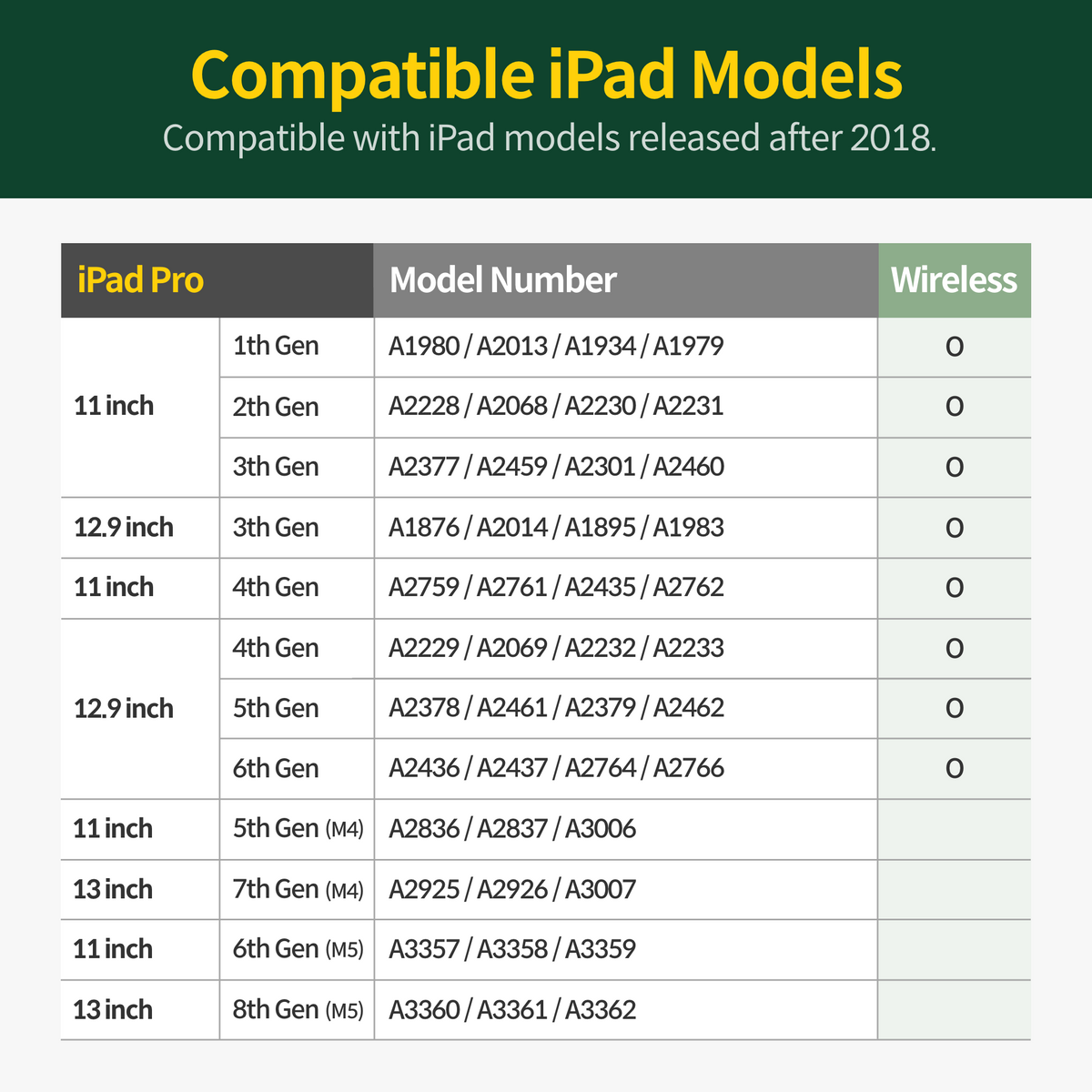
- Wireless Charging Compatibility: Wireless charging is supported only on specific iPad models. Please check the compatibility chart before ordering.
- Eraser-Shaped Tip: The tip on the back is for screen touching and navigation only — it does not function as an eraser.
- What's in the Box: 1 NELNA Pencil (tip pre-installed), 2 replacement tips (3 tips total).
- Certifications: Fully certified for global safety, quality, and environmental compliance (FCC, CE, RoHS, KC, NCC, NTC, JMIC).
NELNA Pencil is not affiliated with or endorsed by Apple Inc. "iPad" and "Apple Pencil" are registered trademarks of Apple Inc., used here solely for compatibility descriptions.


check this
notice for all digital products
DESCRIPTION
· Intended for digital note apps with PDF support: GoodNotes, Notability, CollaNote, Noteshelf, Penly etc.
· This is NOT a physical item. A digital file will be downloadable right after purchase and as with digital items, no refunds or exchanges are accepted after download.
· All formats on Nelnashop can only be used by the customer for individual purposes, without resale in any way, shape, or form.
· Unauthorized copies, appropriation, and distribution are strictly prohibited.
RETURNS & EXCHANGES
· Due to the nature of digital downloads, no exchanges or refunds are possible after download.
· Please double-check the product/version/color before purchasing.
· This product can be used on Laptops and phones, but it is not recommended due to Hyperlink errors and small screen usability.
· Refunds for issues from non-Tablet devices are not accepted.
· Refund requests for individual opinions on design elements (color, font size) and page structure or change of heart are not accepted.
· Refunds or exchanges for cases where the customer does not fully and sufficiently read the instructions in the details page will not be accepted.
· Note apps such as GoodNotes, Notability, CollaNote, and Noteshelf are not included with this product and should be purchased separately.
· All formats marketed on NelnaShop are intellectual property under legal protection.
· Items are intended for individual use ONLY and cannot be resold in any shape or form.
· Unauthorized copies, appropriation, and distribution may be prosecuted by related laws.
FAQ
How to Download a Digital Planner
· For your better understanding, all instructions are based on GoodNotes app.
· Download the product through Safari - if not using Safari, there might be an error.
1. Purchase and download the product.
2. After download, click on Safari’s download list on the top right - hand side - Share - Open in GoodNotes.
3. Click Import as New Document.
4. Success!
How to add Sticker PNGs
1. Open GoodNotes and disable View Mode on the top right-hand side.
2. Click on the Image icon on the top menu.
3. Import the PNG sticker.
4. Click on the Image once again and click Cut.
5. Select Freehand.
6. Draw around the edges of the sticker you want.
· You can adjust the size of the Image with the arrows on the sides
HyperLinks
The hyperlinks will not work in Editing mode.